Skip to content
New schools get their first calendar month completely free. Available on Web & Android.See pricing details →
QClass

Web & Android App · Flat ₹500/month per school

Run your whole school from one place.

Attendance with GPS location check, fee receipts, salaries, exam report cards, timetables, and lesson plans. Built for admins, teachers, students, and parents.

1-minute Excel import Location check (no marking from home) Pay per school, not per student First month completely free
app.qclasss.com/demo_school/overview
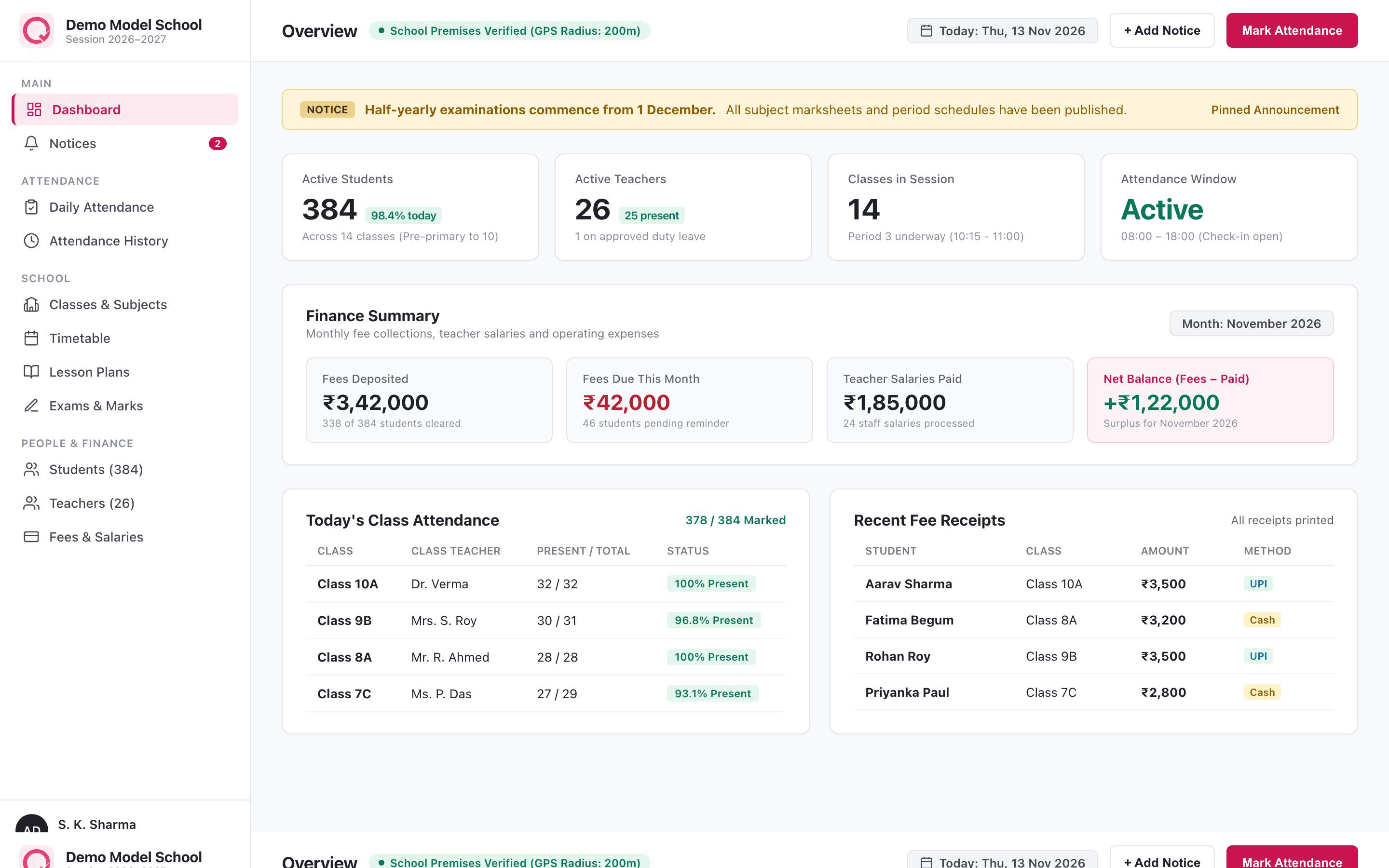
QClass Web Application Dashboard showing school overview, attendance window, and financial summary
Full Desktop Web App
Android App on Google Play ↗
GPS Premises Verification
Printable Receipts & Marksheets
Zero-Delete Data Guarantee

Deep Dive Preview

Built for real daily school operations

Explore real views of the QClass platform — from comprehensive fee ledgers to location-checked attendance and timetable schedules.

Finance & Accounts

Student fee dues, printable receipts, and salary records

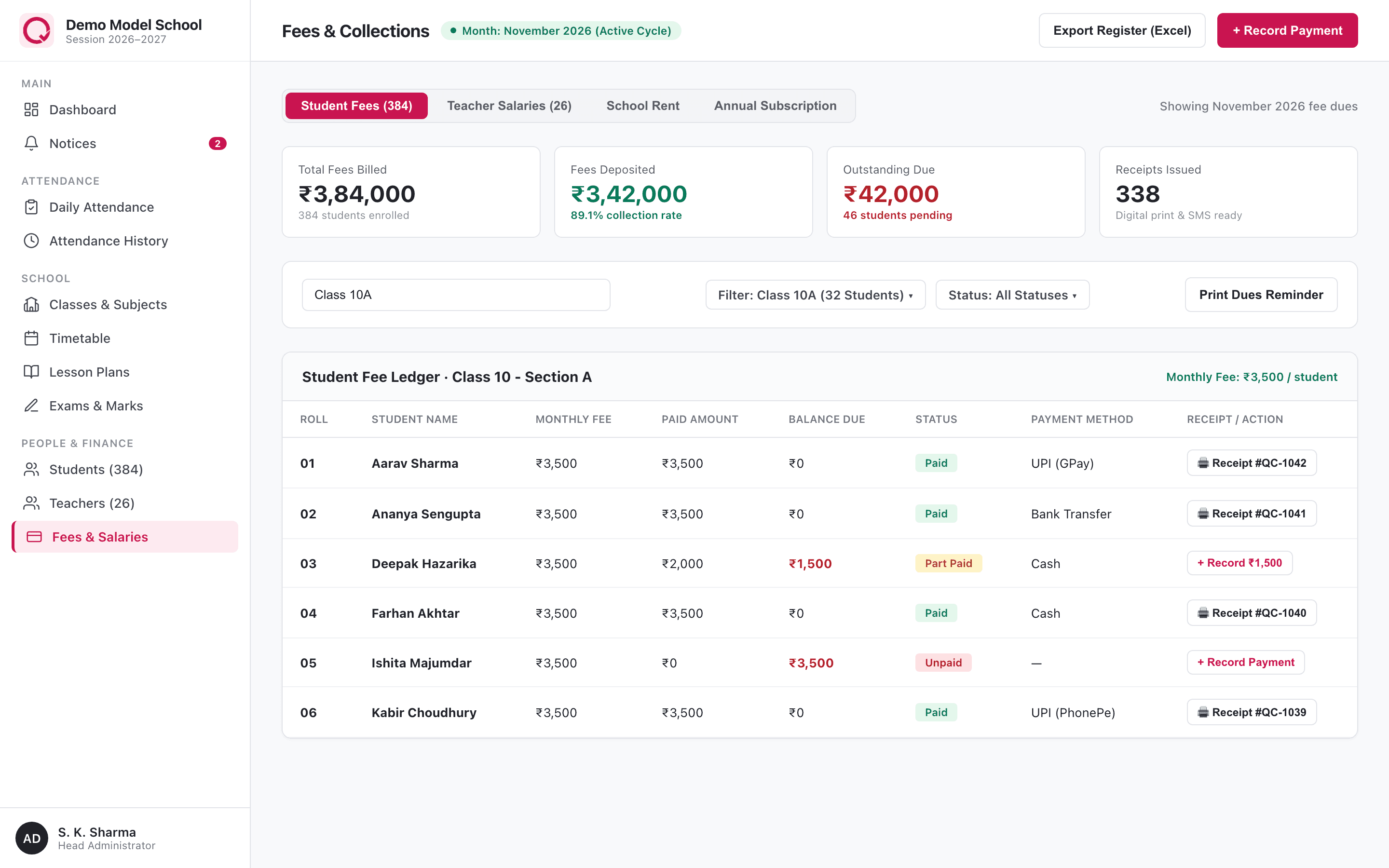
Monitor fee collections, record cash, UPI, bank or cheque payments, and print instant digital receipts. View who owes what by class with parent contact numbers and full payment history.

  • Track fees deposited, pending dues, and issue instant printable receipts
  • Calculate teacher salaries, record payouts, and track school rent
  • Filter by class and status (Paid, Part Paid, Unpaid) with one click
app.qclasss.com/demo_school/fees
Student fee dues, printable receipts, and salary records

On The Go

Official Google Play Android App

Fast, responsive mobile experience for teachers taking attendance and parents checking records in real-time.

Official Android App

Put your school in your pocket.

The QClass Android app is built for speed and simplicity. Teachers mark class attendance in two taps, review daily lesson plans, and check their schedules. Parents see attendance alerts and fee receipts the moment they are recorded.

1-tap attendance check-in
Location GPS perimeter check
Holiday & exam notifications
Light and dark mode

Get it on

Google Play

Rated for all Android phones

Free download · One school login

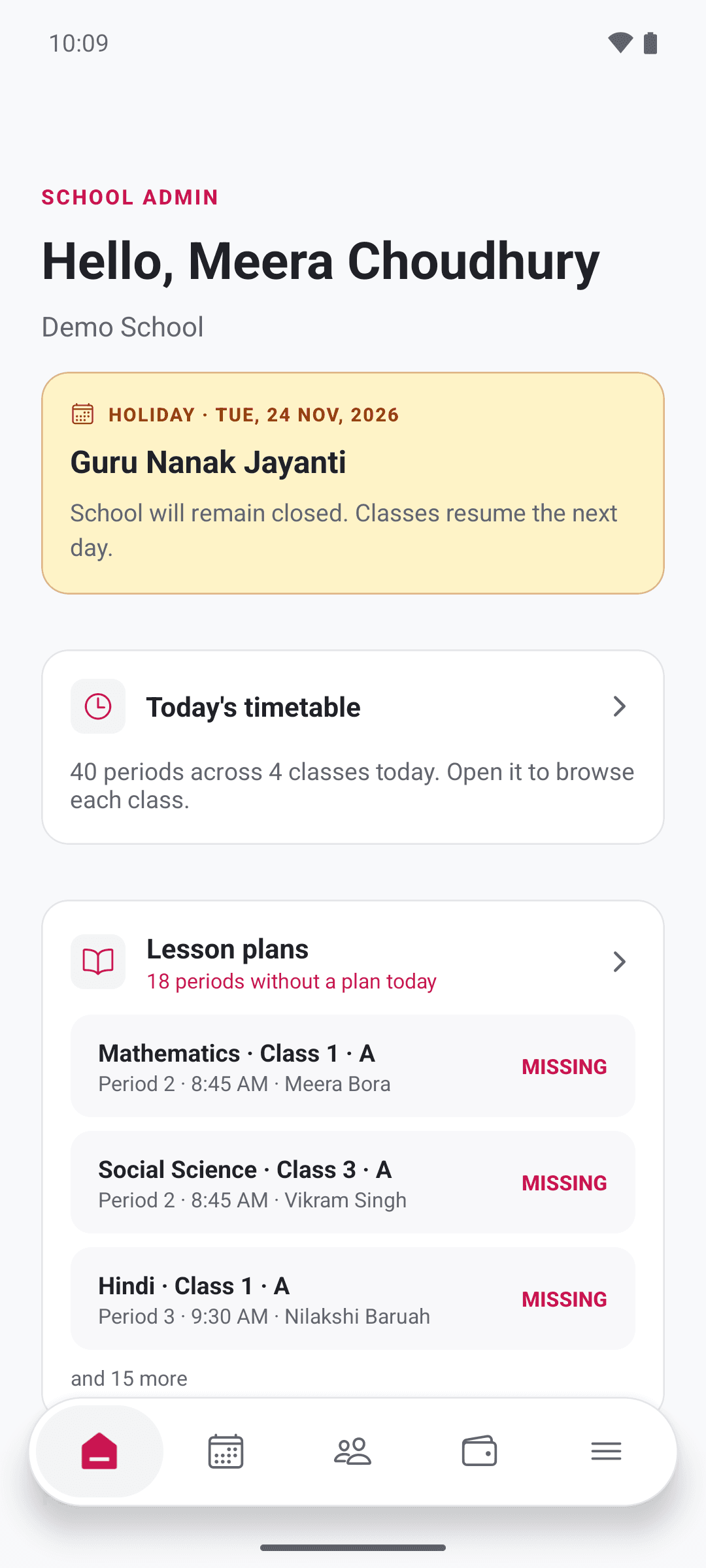
QClass Android App Home Screen with School Notices and Timetable
Home
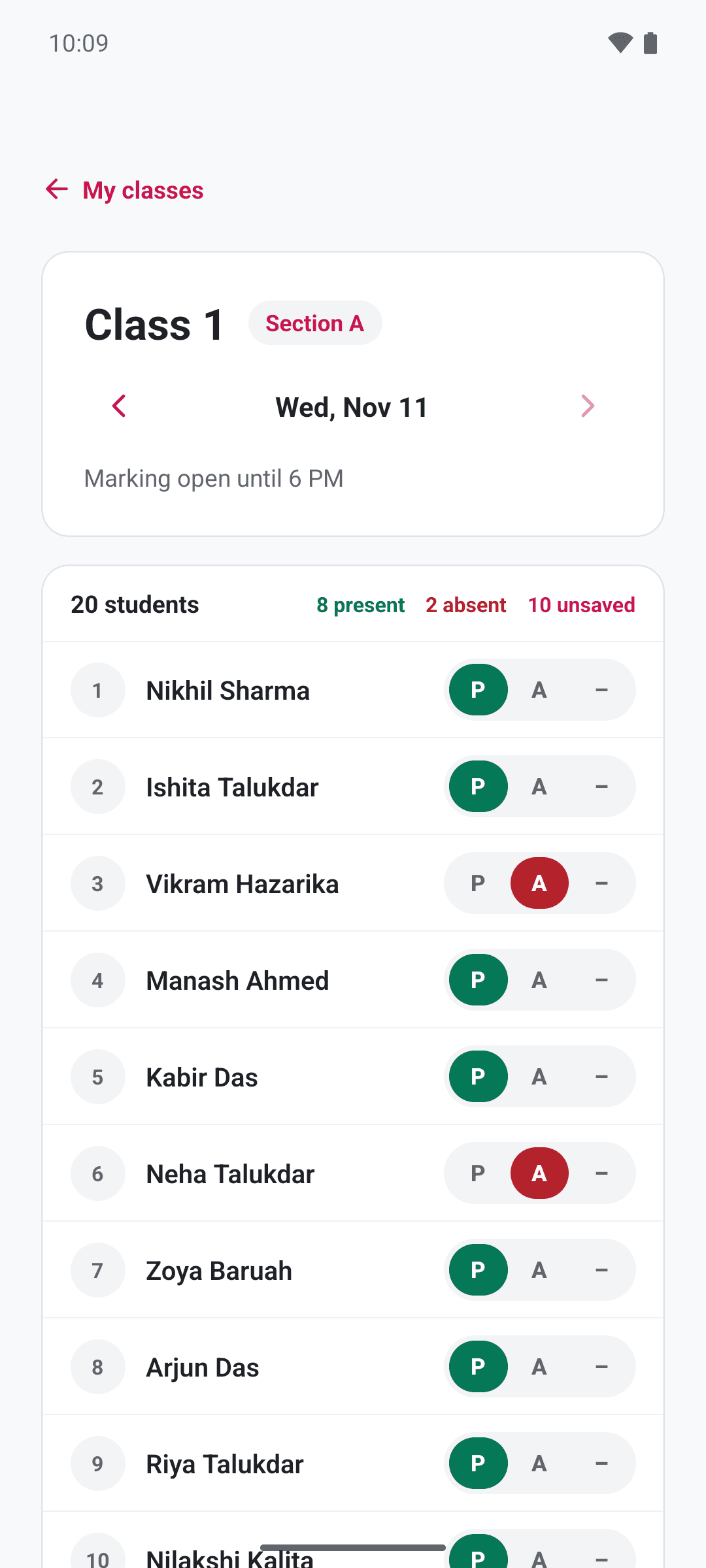
QClass Android App Class Attendance Screen
Attendance

Features

Everything a school runs on

Replace physical registers, fee books, and scattered spreadsheets with one reliable system that the whole school shares.

  • Anti-Proxy

    Attendance you can trust

    Class teachers mark students in seconds, and every teacher marks their own attendance with one tap inside configured time windows. Unmarked is never mistakenly counted as absent.

  • Server Verified

    GPS premises location check

    Attendance can only be marked within the school premises. You set the coordinates and an allowed radius (e.g. 200m). The server checks it, so nobody can mark from home.

  • Finance

    Fees, UPI & instant receipts

    Set monthly fees by class or student, record cash, UPI, bank transfer, or cheque payments, and generate a printable receipt for each one. An unpaid dues list shows who owes what with parent contact numbers.

  • Accounting

    Salaries and rent tracking

    Generate monthly staff payroll, record salary payments, and see what is paid and what is due. Track school premises rent the same way. Teachers see only their personal salary slips.

  • Academics

    Exams and report cards

    Create term exams with maximum and pass marks per subject. Teachers enter marks for their assigned classes, you publish, and report cards format with grade, percentage, class rank and attendance.

  • Scheduling

    Weekly timetable builder

    Build weekly timetables for every class with periods, subjects, teachers and rooms. Automated clash detection ensures no teacher or classroom is double-booked. Teachers and students view their own.

  • Classroom

    Daily lesson plans & homework

    Teachers log the topic, summary and homework for each period they teach. School leaders can monitor syllabus completion across the whole school in real time.

  • Announcements

    Targeted notices & circulars

    Post circulars to everyone, teachers only, or parents and students only. Pin critical announcements and set expiry dates so everyone stays informed.

  • Zero Hassle

    Bulk Excel import & promotion

    Onboard your entire school in minutes from CSV or Excel, with a full preview of any errors before anything is saved. At year-end, promote classes to the next academic session in one guided step.

Who it's for

The right view for everyone

Each person signs in to their own focused portal. Admins manage the institution, teachers run their classes, and parents follow their child's progress.

School admins & Principals

Complete control and financial visibility

  • Oversee entire school: classes, subjects, staff, students and admissions
  • Set GPS attendance radius, school hours, and holiday calendars
  • Manage fee collections, teacher salaries, school rent and audit logs
  • Correct attendance or published exam marks with required audit reason

Teachers

Quick daily routines without paper logs

  • Mark self-attendance and class student attendance in one tap
  • Enter exam marks for assigned classes and subjects with auto-totals
  • Log daily lesson plans, covered topics, and assigned homework
  • View personal weekly timetable and transparent salary payment history

Students and parents

One shared login for the family

  • Single shared family login for each student across web and mobile
  • Real-time attendance calendar, absent alerts and daily timetable
  • Instant exam report cards once published by the administration
  • Fee payment history, digital receipts, and official school circulars

Privacy & Security

Private by design

School records are sensitive. QClass verifies permissions strictly on the server, not just on the screen. Your records remain private, safe, and entirely yours.

Our Lifetime Read Guarantee: Even if a subscription ends, your records are never deleted. Your school simply becomes read-only so you can always review or print past documents.

Multi-tenant separation

Every school is completely isolated in its own private data partition. One school can never see or access another school's records.

Role-based server permissions

Teachers see only classes assigned to them. Parents see only their own children. Authorization checks happen strictly on the server.

Immutable audit trail

Corrections to attendance records or published exam marks require a mandatory reason, and who edited what is permanently recorded.

Zero lock-in guarantee

If a subscription ends, your school records stay readable forever. Data is never deleted — the school simply becomes read-only until renewed.

Pricing

One price for the whole school

You pay per school, not per student or teacher. No surprise per-head fees when your school expands.

Monthly Plan

Pay month-by-month, cancel anytime

₹500 / month

  • Unlimited students, teachers and classes
  • Web app + Android mobile app
  • Location-checked attendance
  • Printable receipts and marksheets
Save ₹1,000 / year

Yearly Plan

Best value for schools across the full session

₹5,000 / year

  • Includes everything in Monthly
  • 2 months free equivalent
  • First calendar month also free
  • Priority data onboarding support

First calendar month is completely free. No credit card required. Cancel whenever you wish.

FAQ

Frequently asked questions

Have a question? Everything you need to know about setting up QClass.

How much does QClass cost?

Pricing is flat per school, not per student or teacher. It costs ₹500/month or ₹5,000/year (save ₹1,000). There are no per-student fees or surprise charges. Every new school gets its first calendar month completely free.

Does QClass have both a web application and mobile app?

Yes! There is a web app (accessible on desktop, laptop, or tablet at app.qclasss.com) and an Android app available on Google Play (com.qclasss). Everyone in your school uses the same username and password on both platforms with real-time sync.

Can attendance really not be marked from home?

Yes. Attendance requires the user's device to be physically within the GPS radius (e.g., 200m) you set around your school building. The coordinates are verified on the server. Admins can still correct an entry with a recorded reason if a device's GPS fails.

How do teachers and parents log in?

Nobody signs up on their own or needs an email address. Your school administrator creates a clean username and temporary password for each teacher and student. Each user is prompted to set a private password the first time they sign in.

Can we migrate our existing student and teacher lists from Excel?

Yes! You can import up to 500 students or teachers at a time using standard CSV or Excel files. QClass highlights any formatting errors or missing fields first, and only imports once all rows are validated.

What happens to our school data if we ever stop paying?

Your records are never deleted or held hostage. Your school simply transitions into read-only mode, meaning admins, teachers, and parents can still view all past attendance records, fee receipts, and report cards forever.

Bring your school onto QClass

Start with a free month. Your school keeps its own logo, its own data, and its own people. No credit card needed.

Have questions or need help onboarding? Write to a7ridi@gmail.com